What you will accomplish
- Connect the selected AyuChat workspace to a WhatsApp Business Account.
- Choose the correct WABA and phone number.
- Verify token, phone, webhook, and template sync health before launch.
Before you begin
- You need a Meta Business admin account for the target business portfolio.
- The WhatsApp Business Account and phone number should be owned by the business you are connecting.
- Keep the correct AyuChat workspace selected.
- Do not share Meta access tokens, passwords, OTPs, or screenshots containing secrets.
Provider policy: Meta may change WhatsApp Business Platform requirements, permissions, review behavior, or pricing. Use AyuChat for product setup steps and refer to Meta's current documentation for provider-level policy decisions.
Step 1 - Open WhatsApp Credentials
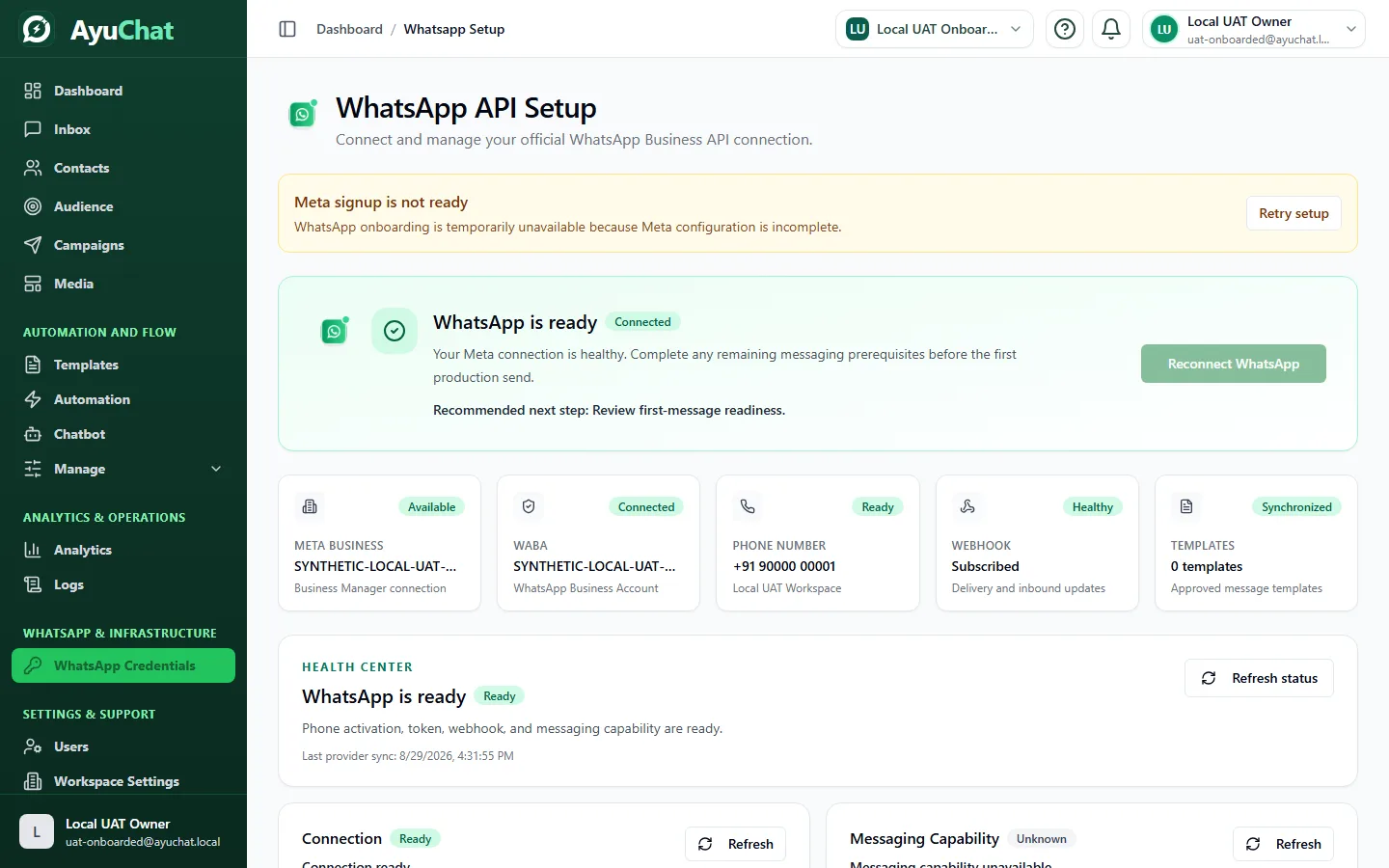
From the customer SaaS sidebar, open WhatsApp Credentials. The page shows the current connection state and the supported connect/reconnect actions for the active workspace.
Step 2 - Start the Meta onboarding flow
- Click the Connect WhatsApp action.
- Sign in to Facebook/Meta with the business admin account.
- Select the intended business portfolio, WABA, and phone number.
- Approve the requested permissions.
- Return to AyuChat and wait for the connection check to complete.
Step 3 - Verify connection health
| Check | Expected result | Why it matters |
|---|---|---|
| Connection status | Connected or Live | Confirms the workspace can use the selected WhatsApp assets. |
| Phone number | Connected and recognizable | Prevents sending from the wrong business number. |
| Webhook | Subscribed or healthy | Enables inbound messages and delivery status updates. |
| Templates | Sync succeeds | Campaigns and outbound Inbox templates require approved templates. |
Step 4 - Sync templates
After connection, open Templates and sync from Meta. Use only templates that are approved for the connected WhatsApp Business Account.
Step 5 - Run a safe launch check
Send a small internal template test, reply from the recipient phone if safe, then confirm that Inbox and delivery logs update. Do not use real campaign audiences until the connection, template, and billing checks are clean.
Troubleshooting
| Symptom | What to check |
|---|---|
| Status stays pending | Meta admin permissions, selected WABA, selected phone number, and browser popup blockers. |
| Templates do not appear | Template approval status in Meta and whether you selected the same WABA in AyuChat. |
| Incoming messages do not appear | Webhook subscription, phone status, and whether the customer messaged the connected number. |
| Reconnect fails | Removed Meta permissions, restricted business portfolio, or wrong logged-in Meta account. |
Next step
Import a small consented contact list and create an internal test campaign.